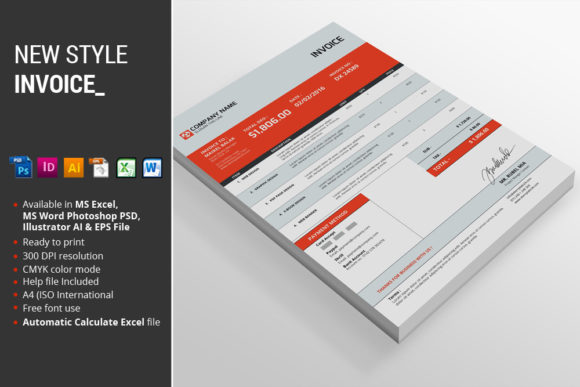
The New Style Invoice: A Modern Toolkit for Business Documents
Managing the administrative side of a business can often feel like a chore, but the documents you send to clients are a direct reflection of your brand. A generic, poorly formatted invoice can undermine the professional work you’ve just delivered. The New Style Invoice package is designed to solve this, offering a cohesive, modern, and highly functional set of templates that transform standard billing into a polished brand touchpoint. This isn't just about getting paid; it's about reinforcing your professionalism with every transaction.
Visual Appeal and Modern Design
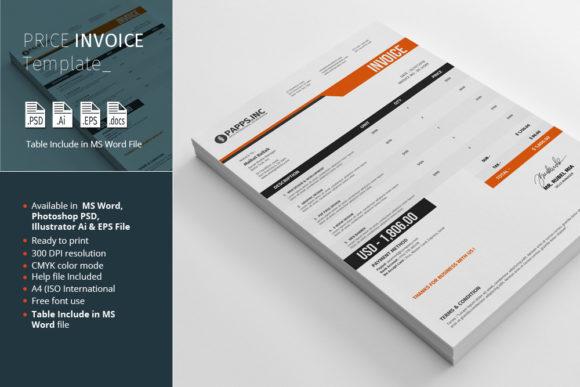
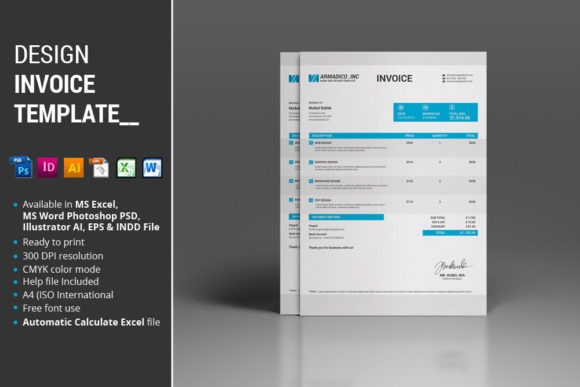
First impressions matter, and the aesthetic of the New Style Invoice kit is built on contemporary design principles. The templates feature a clean, organized layout that prioritizes clarity without sacrificing style. The default color option is a confident, professional red, which draws the eye to key information like totals and due dates. This strategic use of color creates a clear visual hierarchy, guiding your client's gaze exactly where it needs to go. The overall personality is one of efficiency and modernity, making it ideal for businesses that want to project an image of being up-to-date, organized, and detail-oriented. It moves far beyond the limitations of basic spreadsheet templates, offering a design-forward approach to business documentation.
What’s in the Package: A Complete Design Asset Kit
This is more than a single file; it's a comprehensive suite of design assets tailored for various workflows and skill levels. The package includes:
- 1 MS Excel 2010 file: The core of the package for most users. This file comes with automatic calculations for subtotals, taxes, and final amounts, minimizing errors and saving valuable time.
- 1 MS Word 2010 file: Perfect for quick edits and for users who are more comfortable in a word processing environment. It maintains the design integrity while offering simple text editing.
- 1 Photoshop PSD file: For designers who want full creative control. The file features fully organized layers, allowing for easy customization of every visual element.
- 1 Illustrator file: The vector-based option, ensuring your invoice design scales perfectly and remains crisp at any size. Ideal for print or creating other brand collateral.
- 1 EPS file: A versatile vector format for broad compatibility with other design software.
- Instructions PDF: A crucial guide that includes the necessary fonts link, installation instructions, and tips for customization.
The attention to detail is evident in features like the A4 (ISO International) sizing and CMYK color mode, which are essential for professional, high-quality printing. This makes the New Style Invoice a truly premium font and template system for serious business use.
Practical Applications for Your Business
The versatility of this kit makes it suitable for a wide range of professionals. A freelance graphic designer can use the Illustrator or Photoshop files to create an invoice that perfectly matches their brand identity. A small e-commerce owner will appreciate the automated calculations in the Excel file for managing multiple orders. Marketers and content creators can use the Word template for quick, professional billing for their services. It’s a practical tool that directly impacts your workflow, helping you maintain consistency across all client communications. By using a cohesive template, you reinforce brand recognition and build a sense of trust and reliability.
Key Features That Make a Difference
Beyond the core files, several features elevate this package. The automatic calculate function in the Excel file is a game-changer for accuracy and efficiency. The fully organized layers in the PSD and Illustrator files are a thoughtful touch for designers, making customization intuitive rather than frustrating. The inclusion of the CMYK color mode ensures that the vibrant red you see on screen translates accurately to print, a common pitfall with lesser templates. These are the practical details that separate a professional toolkit from a simple download. It’s built for real-world use, understanding that a business owner's time is best spent on their craft, not on wrestling with document formatting.
Choosing and Implementing Your Invoice Template
When evaluating a new design asset like the New Style Invoice, consider your primary workflow. If you live in spreadsheets, the Excel file will be your best friend. If you need to heavily customize the design to match a specific logo design or color palette, the vector files are your go-to. Always test the template with your own information to ensure the layout works for the amount of detail you typically include. Pay attention to readability; the clear typography and spacing in this template are designed to make information easy to digest, which is crucial for getting invoices paid promptly. Finally, remember that consistent use of this template across all your client interactions strengthens your overall brand identity, making your business appear more established and trustworthy.
In the end, the New Style Invoice package is a smart investment for any creative professional, entrepreneur, or small business owner. It streamlines a necessary task while elevating your brand's presentation, proving that even the most routine business documents can be an opportunity for great design.